

Design people can use without a walkthrough
We design websites and apps around the way people actually work. Research, wireframes, visual design, and a shared design system are part of the same project.
From a first sketch to a design system.
From a first version to a redesign of software you already have, we design products people can use without a walkthrough.
Screens designed for one hand
iPhone and Android screens designed for one-handed use, clear gestures, and tasks people can finish quickly.
- Human Interface and Material Design guidelines
- Touch-optimised interaction flows
- Bottom sheets, tabs and smooth transitions
- Offline and loading states designed too
Complex platforms, made calm
Web platforms and dashboards simplified into clean, responsive and data-dense interfaces that are still easy to scan.
- Responsive layouts from mobile to large screens
- Data tables, charts and filter panels
- Progressive web apps
- Role-based dashboard views
One design language for every screen
A shared component library so designers and developers build from the same buttons, forms and colours.
- Figma auto-layout component library
- Semantic tokens for colour, type and space
- Dark mode and theme variants
- Documentation your team can follow
Find where people get stuck
A review of your current product, plus user interviews, to find where people drop off and what to fix first.
- Funnel drop-off analysis
- Usability testing with recordings
- Heuristic evaluation scorecard
- A prioritised list of quick wins
Click it before we build it
Clickable prototypes that look and feel like the finished product, so you can try the flow before development starts.
- Realistic interactions and transitions
- Real-looking data in every screen
- Demos for stakeholders and investors
- Feedback before code is written
Older software, easier to use
A redesign of older business software so staff can complete the same jobs with fewer steps and less training.
- Simpler workflows
- Clear type and a current visual style
- Fewer clicks and less to remember
- A phased rollout that keeps the current system available
A product we designed and run
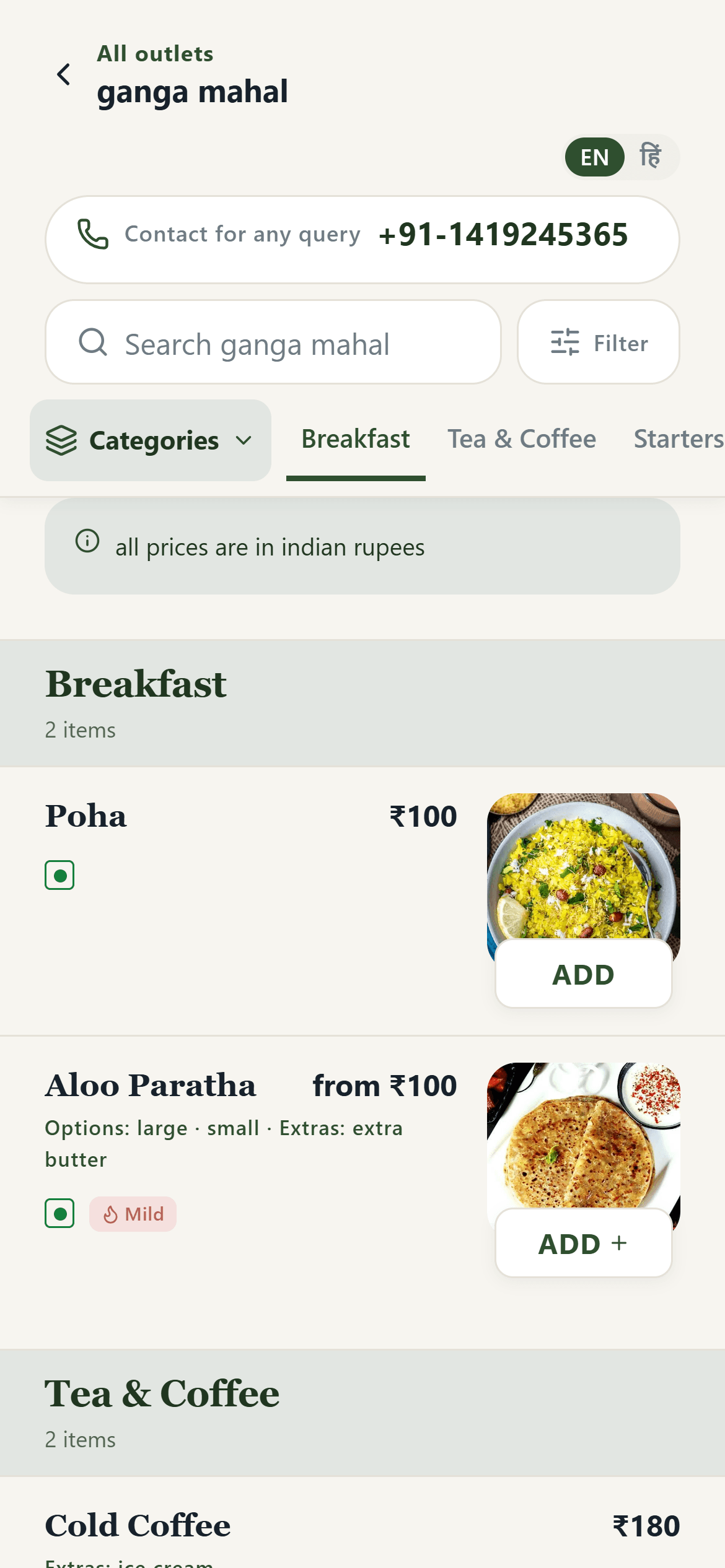
QR App’s interface was designed and built by Shelldan, for guests on their phones and owners at a desk.
A menu that needs no explaining
Big photos, clear prices, veg marks and an English and Hindi switch, designed for one hand on a small screen.
- Clear hierarchy: category, dish, price
- Thumb-friendly add buttons
- Search and filters always in reach
From research to a design developers can build
in 5 stages
Scroll down and follow one project, from the first interview to screens your developers can build with confidence.
Discovery & user research
We learn who will use the product, where they get stuck today, and what the business needs the design to achieve.
- Interviews, personas and journey maps
- Deliverable: research insights and a journey map
UX strategy & wireframes
We turn the research into simple layouts and flows, so the structure is clear before any visual design begins.
- Flows, navigation and hierarchy
- Deliverable: clickable wireframes
Visual UI & design system
A visual system that matches your brand: type, colour, components and the small interactions that make a screen feel finished.
- High-fidelity screens and icons
- Deliverable: a Figma component library
Usability testing & refinement
We test a clickable prototype with real users, then fix the places where people hesitate or take the wrong path.
- User tests and an accessibility audit
- Deliverable: a refined prototype
Developer handoff & QA
We hand the design to developers with spacing, type and behaviour written down, then check the built screens against the design.
- Specs, tokens and responsive rules
- Visual QA of the built screens
Everything in a design project
Six services you can take together or on their own. Open one to see what is included.
Mobile app experience
iPhone and Android screens designed for one-handed use, clear gestures, and tasks people can finish quickly.
Web & SaaS platform UI
Complex web platforms and dashboards simplified into clean, responsive and data-dense interfaces.
Design systems & tokens
A shared component library so designers and developers build from the same buttons, forms and colours.
Interactive prototyping
Clickable high-fidelity prototypes that look and feel like production software before any code is written.
UX research & audits
A review of your current product, plus user interviews, to find where people drop off and what to fix first.
Product redesigns
A redesign of older business software so staff can complete the same jobs with fewer steps and less training.
Get it right on paper, then build it
Cheaper to change now
Moving a box in a design costs far less than rewriting a screen that is already built.
Built around real users
Decisions come from how people actually work, not guesses in a meeting.
Consistent everywhere
A design system keeps every new screen looking and behaving the same.
Easier for developers
Spacing, type and behaviour written down, so screens are built as designed.
Accessible by default
Contrast, sizing and structure checked against WCAG 2.1 AA.
Design and build, one team
The people who design it can also build it, so nothing is lost in between.
Shared files everyone can open
We work in shared tools so product, design and development can see the same files.
Where would you like to start?
Design a new product, improve one you already have, or just talk it through.
Design a new product
From research to a design developers can build.
- User research and journey maps
- Wireframes and flows
- Visual design and a design system
- Tested, clickable prototype
- Developer handoff and QA
Audit or redesign
For software your team or customers already use.
- UX audit and user interviews
- Where people drop off, and why
- A prioritised list of quick wins
- Redesign with a phased rollout
- Accessibility review
A short design conversation, at no charge.
- Show us your product or sketches
- Hear what we would improve first
- Design only, or design and build
- No obligation to go ahead
Questions we hear a lot
Want the design sorted before the build?
Book a short design conversation. We will look at your product or sketches and tell you what we would improve first.